Gold Snowflake Christmas Green Red Art: Your Guide to Luxurious Holiday Crafting
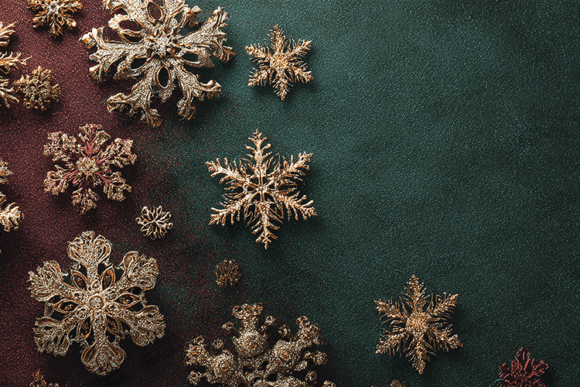
When you’re designing for the holidays, the background or pattern you choose sets the entire tone for your project. Gold Snowflake Christmas Green Red Art isn't just another festive image; it’s a high-resolution, print-ready digital asset designed to bring a specific kind of elegance to your work. This piece combines intricate 3D golden snowflakes with a rich split-tone green and red textured backdrop, creating a visual that is both classic and premium.
People are drawn to this kind of art for its professional finish and versatile applications. Whether you're creating holiday invitations, digital papers for online use, or physical items like cards and scrapbook pages, this artwork promises a touch of seasonal warmth without looking generic. However, simply downloading a file labeled "high quality" isn't enough. To truly leverage its potential and avoid disappointing results, you need a practical understanding of what it is and how to use it correctly.
Mistake 1: Assuming "High Quality" Means Ready for Any Use
A common misunderstanding is equating the term "high quality" with universal suitability. The Gold Snowflake Christmas Green Red Art file is specified as 5824 x 3264 pixels and a JPG. This is a large, detailed image, ideal for many print applications. However, "high quality" here refers to the resolution and detail of the source file, not a guarantee that it will look perfect in every context.
For example, if you use this full-resolution image as a small background on a mobile website, you'll unnecessarily slow down your page load time. Conversely, if you attempt to print it on a physical card at a size larger than its effective print dimensions, you risk pixelation or blur. The mistake is not checking the required final output dimensions against the file's native size.
A better approach is to always calculate the DPI (dots per inch) for your specific print project. A 5824px width, for instance, printed at 300 DPI (a standard for high-quality print) yields a print width of roughly 19.4 inches. If your card is only 5 inches wide, you have ample resolution to crop or scale. Before using the file, resize it in your editing software to the exact dimensions needed for your final product, preserving quality without burdening your project with an oversized asset.
Mistake 2: Neglecting the JPG Format's Limitations for Sublimation
This artwork is promoted as ideal for sublimation printing, a fantastic method for transferring designs onto fabrics, mugs, and other substrates. The overlook here is the JPG file format itself. JPGs are compressed files. While this particular file is likely saved at high quality, compression can sometimes introduce subtle artifacts or limit the editability of colors.
For sublimation, color vibrancy and clarity are paramount. A heavily compressed JPG might not retain the perfect gradient in the red and green backdrop or the sharp definition of the gold snowflake edges when subjected to the heat transfer process. This can lead to a final product that looks slightly muddy or less vibrant than expected.
Practical advice is to use the file as a superb starting point. If you plan serious sublimation work, consider opening the JPG in a program like Photoshop or Affinity Designer and saving your working version as a PNG or TIFF. These formats offer lossless compression or no compression, ensuring the color data remains intact as you make any necessary adjustments for your specific sublimation transfer paper and substrate.
Mistake 3: Overlooking the Split-Tone Background in Design Composition
The split-tone green and red backdrop is a key design feature. It’s not a flat color; it's a textured, blended transition. A mistake is treating the entire artwork as a simple, busy pattern and placing text or other elements haphazardly over it. This can ruin the luxurious effect and make your text unreadable.
For instance, placing white text directly over a bright red section of the background might work, but placing it over the intricate gold snowflake detail will cause visual conflict. The result is a cluttered, unbalanced design that fails to communicate the elegance of the underlying art.
What you should check before designing is the specific layout of the image. Use the green areas or the smoother parts of the textured backdrop as primary "negative space" for your text or focal elements. You might even use a simple, semi-transparent shape (like a slight rounded rectangle) behind your text to create a clear reading zone while still allowing the beautiful gold snowflakes and colors to show around it. This approach respects the artwork’s complexity and ensures your final project looks professional and cohesive.
Mistake 4: Misjudging Its Use for Digital Versus Print Projects
Creators often use a single asset for both digital and print projects, which is efficient, but requires different preparations. Using the Gold Snowflake Christmas Green Red Art for a website banner and a physical invitation without optimization is a typical oversight.
The large file size is perfect for print but problematic for web use, leading to slow-loading pages. Conversely, a version resized only for web would be useless for later print needs. This mistake affects efficiency and can force you to re-source the asset later.
A realistic solution is to create a dedicated workflow. Upon downloading, immediately create two master copies: one pristine, original file archived for all future print needs, and a second, optimized web version. For the web, resize it to the maximum width you'll ever need online (e.g., 2000 pixels) and compress it appropriately using a tool like Squoosh or your software's "Save for Web" function. This preserves the original's value and ensures you have the right tool for every job, saving time and maintaining quality across mediums.
Evaluating the Artwork for Your Specific Needs
Before finalizing any project with this artwork, pause for a quick evaluation. Ask yourself: What is the final output? If it's print, verify the required DPI. If it's digital, consider file size and loading speed. What elements am I adding? Plan your text and graphic placement to complement, not fight, the split-tone background and snowflake details. Am I using the correct file format for my technique? For critical color work like sublimation, consider converting the JPG to a lossless format for editing.
By taking these simple, corrective steps, you move from simply having a beautiful file to expertly applying it. The Gold Snowflake Christmas Green Red Art is a powerful tool for holiday crafting. When you understand its strengths—the high resolution for print, the elegant color palette for classic warmth, the intricate detail for premium style—and navigate its practical considerations, you unlock its true potential. This allows you to create invitations, crafts, and marketing materials that genuinely stand out, reflecting a level of care and quality that your audience will appreciate.